// trivia night at the hall
With testers · iPhone
People are here.
Let's play.
Ready, Set, Bingo! is trivia night at a retro bingo hall, on everybody's phone. Every ball is a question, some of the answers are on your card, and the phones in the room play the same game together. No internet needed, and nobody needs an account.
- H
- G
- S
- A
- F
Each ball's letter and color tell you the category before the question does.
Trivia night, wherever people get together.
One phone calls, every phone plays, and the room starts talking. It fits almost anywhere:
- 🏢The officeTeam trivia for the all-hands, the lunch or the holiday party. Everyone plays on their own phone, with no sign-ups.
- 👨👩👧👦The familyReunions, holidays and game night. Hints help anyone who's stuck, so the kids and the grandparents play together.
- 🎉The partyBirthdays, showers and classrooms. The host's phone calls every ball and checks every Bingo, so nobody has to referee.
- 🙋Just youA quick round against three pretend rivals, whenever you have a few minutes.
Bingo, where every ball asks a question.
A blower on a cherry-red stand pops the balls, and the one that's called shoots up the tube. Around it is a whole bingo hall: a lighting rig, a board that lights up with the calls, and little scenes from hall life, like the ducks, legs eleven, the false alarm and the intermission dance. Your card is 5×5, 4×4 or 3×3, and there are eight shapes to fill, from Any line to Blackout.
How a game goes.
- The curtain opens.Every round starts behind a closed curtain, with the shape to fill named at the top of the screen. Then the caller's phone counts it in,
READY, SET, BINGO!
, and every phone in the room gives the first ball the long spin. - The ball flies.Up the tube it goes. Its letter and color name the category.
- The question.In Guess It the question comes first, and the bulbs around your card count down your thinking time. Then come up to three hints, then the answer. Tap Hint to see the next one sooner; on the caller's phone that brings the answer sooner too. In Just Play the answer shows as the ball lands.
- Daub it.Tap the square and the dauber stamps it. Know it before the answer shows? Daub it, and you've guessed it. A square that hasn't been called just buzzes.
- Not there?Plenty of calls aren't on your card, and you don't have to hunt. A second after the answer shows, the phone stamps
NOT ON YOUR CARD
across your card, and in Just me, while the blower calls by itself, the next ball comes a few seconds later. - Bingo calls itself.The moment the calls finish your pattern, your phone claims it and the host's phone checks it against the calls. It goes by the calls, not by your daubs, so a missed daub never costs you a Bingo. A call you missed is marked for you when the next ball drops; that's a setting, and it starts on.
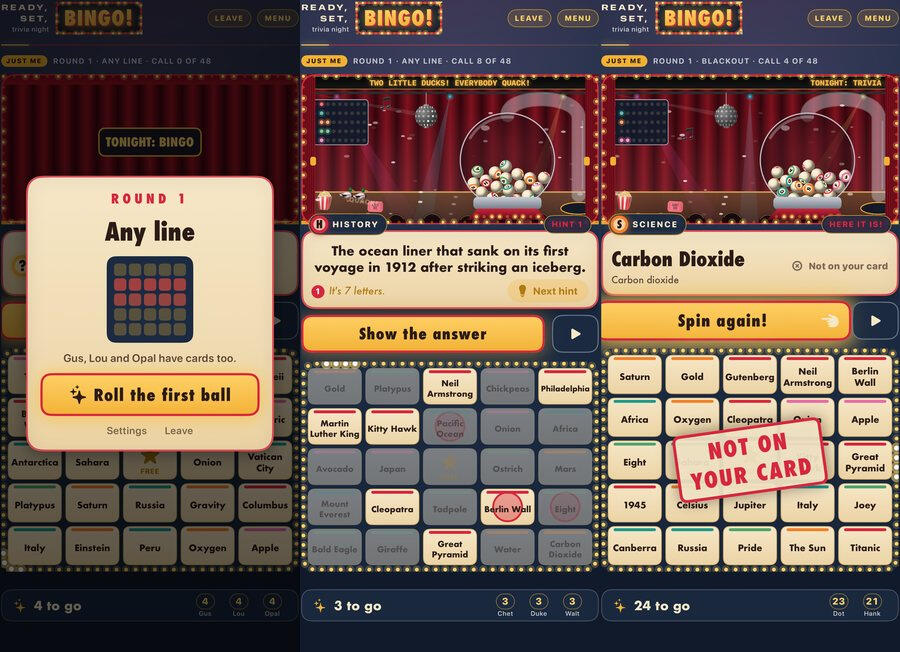
A round, in three screens.
- The round opens.The winning shape, who else has cards, and the first ball.
- The question.A History ball and its first hint. Only the History squares stay lit.
- Not on your card.Carbon Dioxide isn't on this card, and the phone says so. Spin again!
Three moments, each from a different game of Just me against pretend rivals. The questions in them are a small sample, not the finished set.
Play it in the same room.
One phone hosts and everyone else joins from their own. The phones find each other over the room's Wi-Fi or straight phone to phone, and every phone works out its own card.
- 📣Everyone hereThe host taps Quick Play, then Everyone here, and plays along on the same phone. Host Game is there for anyone who wants to pick the card, the pattern and the pace first.
You call. Phones nearby join with a tap.
- 📲Join with a tap, or a PINEveryone else taps Join Game and picks the game from the list, or types the six-digit PIN from the host's screen. No sign-up, no account, no internet.
Join with PIN
- ⏸️The host runs the roomPause everyone, take back the last call, end the round, keep playing for more winners, or start the next. If the host's phone goes quiet, somebody else can take over hosting.
Take over hosting
- 🙋Just meNobody else around? The blower calls by itself and three pretend rivals race you for the line. A host can also add pretend players to warm up a quiet room.
Three rivals race you.
Create a Game: your people, your questions.
A birthday, the office party, the family. Pick the occasion, name the game, say who's playing and pick the tone (silly, warm or game on), then tell it about your people, one fact per line, or answer the questions the occasion suggests. Eight questions deal a 3×3 card, sixteen a 4×4, and twenty-four the full 5×5; a 3×3 with fewer than twelve is won with four corners. A game you make always asks its questions, and its name is on the card that opens each round.
- Company party
- Family get-together
- Birthday
- Baby shower
- Wedding shower
- Holiday party
- Classroom
- Game night
- Reunion
- Something else
- Apple Intelligence can draft the questions, on the phone. On an iPhone that has it switched on, it writes one question for each fact you typed, from your facts only. It is told never to invent facts about real people, to keep every question kind, and to stay off weight, looks, money, health, religion and politics.
- You check every drafted question before it's played. Drafted ones are marked Drafted · check it, and each plays only once you tap Looks right or change it. You can change any question or throw it out, and two questions whose squares would read the same stay out of the game until you change one.
- It works without Apple Intelligence too. Write the questions yourself, or start from the occasion's ideas. Everything else in the game is the same on any iPhone it runs on.
- Save it for next time. Games you make wait in My Packs, to play or edit again.
For now, a game you make plays on the phone that made it, against pretend rivals. Hosting it for the room's other phones comes later.
What you pay.
- Theme packs are planned as one-time purchases. None is built yet, so none is listed here; when they exist, this page lists them.
- Nothing you have paid for ever moves behind a new price.
What stays on your iPhone, and what goes over the air.
Your name, your settings, the game in progress and the games you make are kept on your own iPhone. There is no account and no server of ours. Playing on your own sends nothing; playing together means the phones talk to each other over the local network, and this is what they say:
| When | What leaves your phone | Where it goes |
|---|---|---|
| You host a room game, or take over hosting | An announcement of the game: your name, a random player number, a code for the game and, while Show the PIN is on, the PIN itself. Switched off, nothing in it gives the PIN away, and it stays off until you switch it back on | Any device on the same Wi-Fi or nearby that looks for it |
| You join | Your name, a random player number and the PIN | The game you tapped. If you type the PIN instead, the game showing it, or else every game nearby that keeps its PIN hidden; only the right host answers |
| You play | Your Bingo claims, and your phone's copy of the game (names, the PIN, calls and wins) whenever it differs from the host's. Never your daubs | The host's phone |
| The host runs the game | Every player's name, the PIN, the calls and the wins | The phones the host has let into the game |
The messages between phones go straight from one to another, with no server in between, and they are not encrypted: they carry names, a PIN and a game of bingo. The host's name is in the announcement, and each phone gives its name to any phone it connects to, so play under a name you are happy for anyone nearby to see. When Apple Intelligence drafts questions, your facts go to Apple's language model on your own phone. The app has no analytics, no advertising and no tracking. The full list is in the privacy policy below.
Ready, Set, Bingo! is still being made. It runs on its maker's phone today, testers get it next, and it is not on the App Store yet. It is made for iPhone, held upright: there is no iPad or Mac version. Not in this version: any language but English; hosting a game you made for the room; the theme packs; and the Pop Culture and Retro Rewind questions. The questions it plays today are a small General Trivia sample standing in for the finished set.
Ready, Set, Bingo! — Support
Trivia bingo for the phones in the room.
Most of the game explains itself once the first ball flies: the first game shows a short How it works card, and How to play is on the home screen. This page answers what people ask at the table. Anything else, write to us using the form below.
Or just write to us.
There is one person behind this shop, and he reads everything that comes through this form. Three kinds of message are all welcome, and they all arrive in the same place:
- Something is wrong with the game. Say whether you were hosting, joining or playing on your own, what you tapped, and what you expected instead.
- A question is wrong. Tell us the question and what the answer should have been.
- You want software built. Not only iPhone apps. If the thing you use every day at work is worse than it should be, describe it and you will get a real answer about whether it is worth building. Quotes are free and the first reply is a person.
Your name, your email address and your message are emailed to the shop. They are used to answer you and nothing else. The full account is in the privacy policy below.
Common questions
- How do the other phones join?
- One phone hosts: Quick Play ▸ Everyone here, or Host Game ▸ Open the game. Everyone else taps Join Game. The game shows under Games nearby as the host's name, then 's game: tap Join on it. If it says Needs the PIN, type the six digits the host's screen shows under Join with PIN, then Join. Nobody needs an account.
- Do we need Wi-Fi, or the internet?
- No internet needed. The phones find each other and play over the room's Wi-Fi or directly phone to phone, so everyone has to be in the same room.
- Why is it asking about Local Network?
- Because finding the phones nearby needs it. iOS asks the first time you host a room game or open Join Game, and never for Just me. If you said no, the app says so: turn it on in Settings ▸ Privacy & Security ▸ Local Network, then try again.
- The game is not showing up under Games nearby.
- Check that Local Network is on for the app on both phones, and that both are on the same Wi-Fi or close together. Typing the PIN finds the same game, so it only helps once the game shows up in the list.
- What if a phone drops out?
- A player's phone that loses the host looks for it again and reconnects by itself, and when it is back it catches up on the calls it missed. If the host's phone goes quiet for twelve seconds, the others see The host has gone quiet. and a player can tap Take over hosting. The game is saved after every change, so closing the app does not lose it: open it again within three minutes and it picks up where it was. Leave a game for three minutes or more, in the background or closed, and it is over for your phone: the app goes back to Home and says why, and in a room you tap Join Game to play again. A host who leaves chooses to end the game for everyone, or to leave and let someone take over.
- Why won't a square take my ink?
- A square takes ink only once its answer has been called, or when it is the question on screen and you are guessing it. Anything else buzzes, shakes and says Not called yet. Keep looking! or Not that one. Keep thinking! A daub cannot be taken back, so aim.
- The answer isn't on my card.
- That's normal: a round calls more answers than a card has squares, so plenty of calls are not on yours. You don't have to do anything. About a second after the answer shows, the phone stamps NOT ON YOUR CARD across your card and writes Not on your card beside the answer, and in Just me, while the blower calls by itself, the next ball comes a few seconds later. While it is your move, the squares in the call's category stay bright and the rest dim, and if the answer is on your card its square starts to pulse five seconds after the answer shows.
- I missed a call.
- With Mark missed calls for me on (Settings ▸ Help while playing; it starts on), every earlier call on your card is marked for you in dashed ink when the next ball drops. Spotting help, also on to start, outlines called squares you have not marked. Every call so far is in Menu ▸ The calls so far.
- Do I have to call Bingo?
- No: Bingo calls itself. The moment the calls complete your pattern, your phone claims it and the host's phone checks it against the calls. The bar at the bottom counts down, 3 to go, One to go!, and it goes by the calls, not by your daubs, so a missed daub never costs you a Bingo.
- No sound?
- Music and sounds follow the ringer switch. To hear them with the ringer off, turn on Play with the ringer off in Settings (with Sounds on). Background music, sounds and haptics each have their own switch there. The screen stays awake while a game is on.
- Can the game go faster, or slower?
- Yes: Host Game ▸ Change the game ▸ Pace. Steady gives 14 seconds to think, 8 for each hint and 12 after the answer before the next ball; Relaxed is 20, 10 and 20; Brisk is 9, 5 and 8. With By hand the host taps Show the answer and Spin. Under How calls are shown, Guess It shows the question first; Just Play shows the answer as the ball lands. Tap Hint for the next hint sooner, and the host can pause the whole room.
- Can the room join a game I made in Create a Game?
- Not yet. For now a game you make plays on the phone that made it, against pretend rivals. Hosting it for the room's phones comes later.
- Why can't I draft questions with Apple Intelligence?
- The drafting button appears on Your questions once you have typed at least one fact, and again whenever you add facts it has not drafted from yet. Drafting needs an iPhone that has Apple Intelligence, with it switched on and ready, and the app says which of those is missing. Everything else in Create a Game works without it: write the questions yourself, or start from the occasion's ideas.
- Does it work on iPad or Mac?
- There is no iPad or Mac version. It is made for iPhone, held upright, on iOS 26 or later.
- Does the app track me or show ads?
- No analytics, no advertising, no tracking and no account. What travels between the phones in a room game is listed in full in the privacy policy.
Ready, Set, Bingo! — Privacy Policy
Last updated 25 September 2026
Ready, Set, Bingo! has no account and no server of ours. What the app keeps, it keeps on your own iPhone. Nothing about you is sold.
It is a game for a room full of phones, though, and the phones have to talk to each other. So rather than claim that nothing ever leaves the phone, every occasion is listed below with exactly what it carries. None of it reaches us.
What the app stores, and where
- Your settings: the name you play under (Player until you change it), a random player number made once for this install, which is not an Apple identifier and identifies nothing but this copy of the app, the last game you set up, your switches for help, sound, music, haptics and Show the PIN to phones nearby, and whether you have seen the How it works card. They are kept in the app's own storage on your iPhone.
- The game in progress is saved after every change (and at least every half minute), with the time it was saved, so a game survives the app being closed and opened again within three minutes. It holds the game itself (every player's name, the PIN, the calls and the wins) and the squares you marked. It is deleted when you leave the game, whenever a new one starts, and when the game has been left for three minutes or more.
- Games you make in Create a Game are saved in My Packs: the title, the occasion, who's playing, the tone, the facts you typed and which of them Apple Intelligence has already drafted from, anything you asked it to stay away from, and every question and answer, with the dates it was made and edited. Removing a game from My Packs deletes it.
- Like any app's data, all of this is included in your iPhone's own backups, to iCloud or to a computer, if you make them.
- If the music engine hits an error, a description of it can go to the iPhone's own system log. It is not sent anywhere.
- Deleting the app removes everything it kept on the device.
Permissions the app may ask for
- Local Network: asked the first time you host a room game or open Join Game, with the app's reason: "Ready, Set, Bingo! looks for games on phones nearby, over this Wi-Fi or phone to phone, so everyone in the room can play together." It is never asked for Just me, or for a game played on this phone alone. Without it, playing with other phones does not work, and everything else does.
- That is the only one. The app never asks for the camera, photos, microphone, contacts, location, calendar, notifications, Bluetooth or permission to track you. Apple Intelligence is a setting on your iPhone, not a permission the app asks for.
Everything that leaves your device
This is the complete list. In this version, nothing on it goes further than the local network: the Wi-Fi you are on, or phone to phone nearby. The last item, Apple Intelligence, stays on this phone. The app itself makes no request to the internet, and there is no server for anything to go to.
- Playing on your own: Just me, Play it now in Create a Game, or Play in My Packs. Nothing leaves. The app does not announce a game, look for one or connect to anything.
- Hosting a room game (Quick Play ▸ Everyone here, Host Game ▸ Open the game, tapping Take over hosting when the host has gone quiet, or opening the app again, within three minutes, into a room game you were hosting). Your phone announces the game with Bonjour, the standard way devices find each other on a local network. The announcement carries which app it is, your name (up to 40 characters), your random player number, a number that identifies the game, and, while Settings ▸ Hosting ▸ Show the PIN to phones nearby is on, the six-digit PIN itself. That setting starts on and stays the way you leave it. With it off, nothing in the announcement is worked out from the PIN, so the app's Join list asks for it. Any device on the same Wi-Fi, or near enough to reach phone to phone, can read the announcement, not only this app. It stops when you leave the game.
- Joining: when two phones connect, each tells the other its name and player number. The phone asking to join sends the PIN, its name, its player number, and which game and version of the built-in questions it has. That goes to the game you tapped. If you type the PIN instead, it goes to the game whose announcement shows it, or, if none does, to every game nearby that keeps its PIN hidden; your phone connects to each, so each gets your name and player number, and the hosts whose PIN it is not ignore the request.
- Playing in a room: the host's phone sends the phones it has let into the game the game itself: every player's name and player number, the PIN, the game's settings, which calls have been made, and who has won. The phones pass that back and forth to stay in step, and every two seconds the host's phone sends them a short check-in: numbers that identify the game, its host and its current state, and a short code made from the PIN. Your phone sends the host a Bingo claim (your player number and the round, nothing else) and a message when you leave, and the host tells every phone in the game the result of each claim. So everyone in the game sees every player's name and the PIN. A device that connects to the host's phone without being let in gets only its hello: the host's name and player number.
- What does not travel: the squares you mark stay on your phone, because the host checks a Bingo against the calls, not against your taps. The question and answer text does not travel either; each phone reads its own built-in questions. Nor does a game you made: for now it plays only on the phone that made it.
- How it travels: straight between the phones, over the room's Wi-Fi or phone to phone. It is not encrypted, so another device on the same local network could read it. What it carries is names, the PIN and the state of a bingo game, so play under a name you are happy for anyone nearby to see.
- Apple Intelligence: when you ask Apple Intelligence to write your questions in Create a Game, the facts you typed that it has not drafted from yet, the occasion, who's playing, the tone and anything you asked it to stay away from go to Apple's on-device language model, through Apple's Foundation Models framework. The app makes no network request of its own for this.
The app has no analytics, no advertising, no advertising identifier, no crash reporting and no third-party tracking. Apart from Apple Intelligence, which runs only when you ask it to write questions, everything on the list above starts because somebody hosts, joins or plays a room game, or opens the app back into one.
The other players
A room game shows each player's name to everyone in it. The host's name is in the announcement for anything nearby to read, and every phone says its own name to any phone it connects to; the host's phone sends the other players' names only to the phones it has let in. The name is whatever you type in, and it is Player until you change it. The pretend rivals in Just me and the pretend players a host can add are made up on the phone; they are not people.
What is never done
Nothing about you, or about the people whose facts go into a game you make, is sold, rented, or handed to a data broker: not aggregated, not anonymized, not “with a trusted partner”. No profile of you is built anywhere. The phones in a room game keep your name and player number with that game until they leave it or start a new one.
How future decisions get made
Everything above describes the app as it is today, and every line of it can be checked. Two things are planned and not built: sending a game you made to the other phones in the room, and a Pack Store for theme packs. Both will be described on this page before they ship.
If this app ever needs a third-party service, or a kind of data it does not take today, that choice gets made for the person using it rather than for the revenue, it will be described here before it ships, and it will be switchable off wherever it can be.
Purchases
This version has nothing to buy inside it and asks nobody for payment. Ready, Set, Bingo! is planned as a game you pay for once, up front, on the App Store, where Apple handles the payment and shows the price before you buy. Theme packs are planned as one-time purchases through Apple too, and none exists yet. Either way, Apple handles the payment and the developer never sees your payment details.
Children
Ready, Set, Bingo! is a party game for groups of any age, families included. It asks nobody for an account, an email address or an age, and the app sends the developer nothing. A name typed into the game goes only to devices on the same local network: the phones in the game, the hosts a request to join reaches, and, for whoever is hosting, any device that connects to the host's phone or reads the game's announcement. So a first name or a nickname is the right thing to type.
Changes
If this policy ever changes, the updated version will be posted at this address with a new date at the top.
Writing in
Contact is a form on this page rather than an email address. What you type into it (your name, your email address and your message) is emailed to The Butcher Shop LLC by the service that hosts this website, and that service's own privacy policy covers the delivery. The message is used to answer you, and the reply comes from the person who made the app. The app itself has no part in this: writing in sends nothing from your device, and nothing you say in the form is joined to anything in the app.
Contact
Questions about privacy in Ready, Set, Bingo!: Send us a message.
